How to Track QR Code Scans (Analytics, Location, Device Data)
You printed 500 flyers with a QR code. People are scanning it — maybe. You have no idea how many, from where, or on what device. That's the problem with most free QR code generators. They create the code but give you zero visibility into what happens next.
That means you have no idea if your flyers, business cards, or signs are actually working.
Tracking QR code scans means knowing exactly who's scanning, when, where, and how often. Here's how it works and how to set it up.
QR Code Tracking: Static vs Dynamic (Why Only One Works)
There are two types of QR codes. Static codes bake the destination URL directly into the code — when someone scans it, they go straight to that URL. There's no middleman, which means there's no way to count the scan.
Dynamic QR codes work differently. The code points to a tracking URL on a server. When someone scans it, the server logs the scan and then redirects them to your destination. Same result for the person scanning, but now you have data.
If you want tracking, you need dynamic QR codes. That's the baseline.
h2>How to Track QR Code Scans (Quick Answer)You can only track QR code scans using dynamic QR codes. Static QR codes cannot be tracked because they link directly to a destination without passing through a tracking server.
To track scans:
- Create a dynamic QR code
- Use a platform with built-in analytics
- View scan data (location, device, timestamp) from your dashboard
What you can actually track
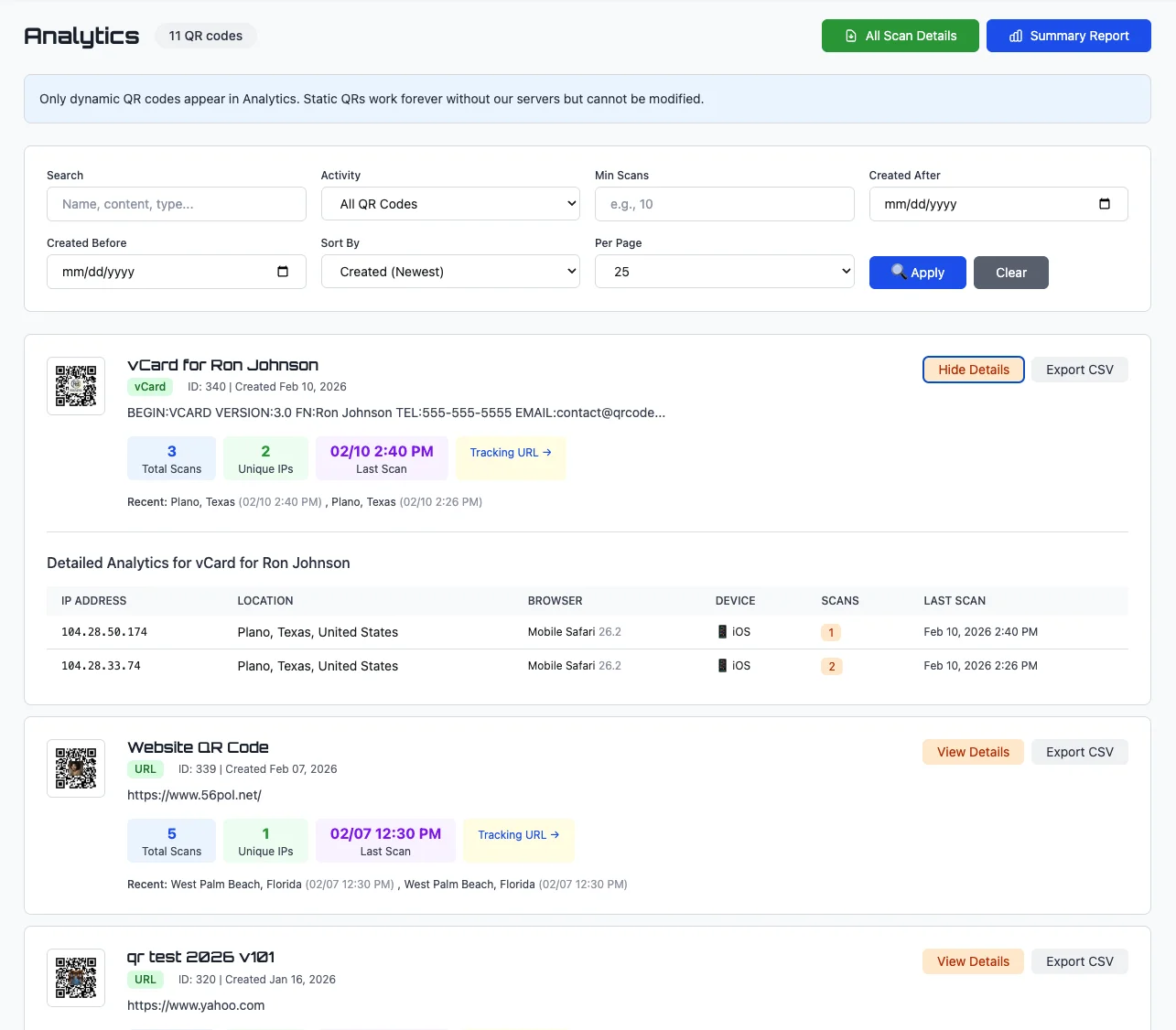
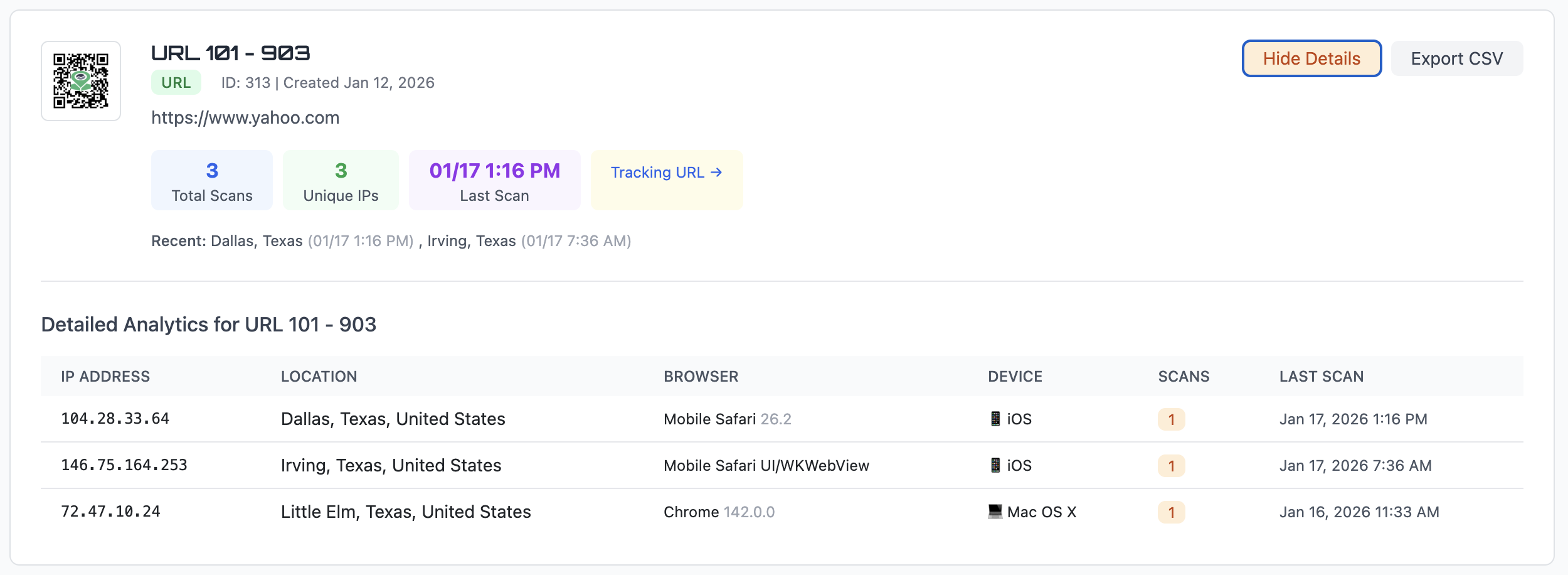
A good tracking dashboard shows you more than just a number. Here's what QR Code Better tracks for every scan:
Total scans. How many times the code has been scanned overall.
Unique visitors. How many different people scanned it, based on unique IP addresses. If one person scans three times, you see 3 total scans but 1 unique visitor.
Location. City and country for each scan, based on IP geolocation. You'll know if your flyers in Dallas are getting more traction than the ones in Austin.
Device and browser. iPhone or Android? Safari or Chrome? This tells you what your audience is using, which matters if your landing page needs to work differently on certain devices.
Timestamp. Exactly when each scan happened. Useful for seeing if your lunch rush QR code actually gets scanned during lunch.
Last scan. When was the most recent scan? If a code hasn't been scanned in weeks, maybe it's time to move it somewhere else.
How to set it up
There's no complicated integration. You don't need Google Analytics or Tag Manager or any third-party tools.
- Create a free account on QR Code Better
- Choose "Dynamic" when creating your QR code
- Enter your destination URL
- Download your QR code
That's it. Every scan is tracked automatically from the moment someone scans your code. You can view analytics from your dashboard anytime.
Real-world examples
Restaurant menu. You put a QR code on every table. Tracking shows you that Table 4's code gets scanned 30 times a week while Table 12 gets 3. Maybe Table 12's code is damaged, or maybe nobody sits there. Either way, now you know.
Business cards. You hand out cards at a conference. A week later, you check and see 14 scans from three different cities. Your card traveled further than you did.
Flyers and posters. You put up posters in five locations. Tracking shows one location driving 80% of your scans. Next month, you double down on that spot and skip the dead ones.
Product packaging. A QR code on your product links to setup instructions. Scan data tells you how many customers actually use it and when they tend to set things up — weekday evenings, mostly.
What about Google Analytics?
You can use Google Analytics on your landing page to track visits. But it won't tell you which QR code sent the traffic unless you set up UTM parameters for every single code. And even then, you're mixing QR scan data with all your other web traffic.
Built-in QR tracking is cleaner. One dashboard, one place to check, scan data only. No filtering through noise.
Export your data
QR Code Better lets you export scan data to CSV. This is useful if you need to put scan reports into a client presentation, share results with your team, or do deeper analysis in a spreadsheet.
QR Code Tracking vs No Tracking
- Without tracking: You print QR codes and hope they work
- With tracking: You know exactly what gets scanned and what doesn’t
The free trial includes tracking
You don't need to pay to test this. The 14-day free trial includes full analytics — create up to 5 dynamic QR codes and see tracking in action before you commit.
Plans start at $10/month for up to 10 tracked QR codes if you need more.
Start tracking
Create your first tracked QR code in under a minute. You'll wonder how you ever used QR codes without knowing if anyone was scanning them.