Minimum QR Code Size: Why Most QR Codes Fail to Scan
Most QR codes fail because they are printed too small.
If your QR code does not scan instantly, people will not try again. Here is how to size it right for print, screens, and signage.
What Is the Minimum QR Code Size?
The absolute minimum QR code size is 0.8 inches (2 × 2 cm), but that only works in ideal conditions — good lighting, a close scanning distance, a clean print, and a modern phone.
In real-world use, most QR codes should be at least 1 to 1.25 inches if you want reliable scanning. That matters most on business cards, product packaging, flyers, and anything else people scan quickly without much effort.
Bottom line:
0.8 inches is the technical minimum. 1 inch or more is the practical minimum for most uses.
If you are creating a QR code for a small printed piece, see our guide on QR codes for business cards for more guidance on layout and usability.
How Small Is Too Small?
A QR code can technically work below 0.8 inches, but real-world performance drops fast.
- Below 0.8 inches: unreliable, inconsistent scanning
- 0.8 inches: works in ideal conditions only
- 1–1.25 inches: reliable for business cards and print
- 2+ inches: strong performance in most conditions
The smaller you go, the more you depend on perfect lighting, modern phones, and user patience.
Recommended QR Code Size by Use Case
| Use Case | Recommended Size | Why It Matters |
|---|---|---|
| Business card | 1–1.25 inches | Close range, but needs fast scanning |
| Flyer or brochure | 1.5–2 inches | Usually scanned at arm’s length |
| Poster | 3–5 inches | Viewed from a few feet away |
| Store window | 8–12 inches | Needs to work from outside or across open space |
| Product packaging | 0.8–1 inch | Use flat areas, avoid tight curves and seams |
| Screens & slides | 10–15% of slide height | Give people 10–15 seconds on screen to scan |
| Billboard | 30+ inches | Requires long-distance visibility; only use where people can stop |
Most QR codes fail because they are printed at the minimum size instead of the recommended size. When in doubt, go bigger.
The 10:1 QR Code Size Rule
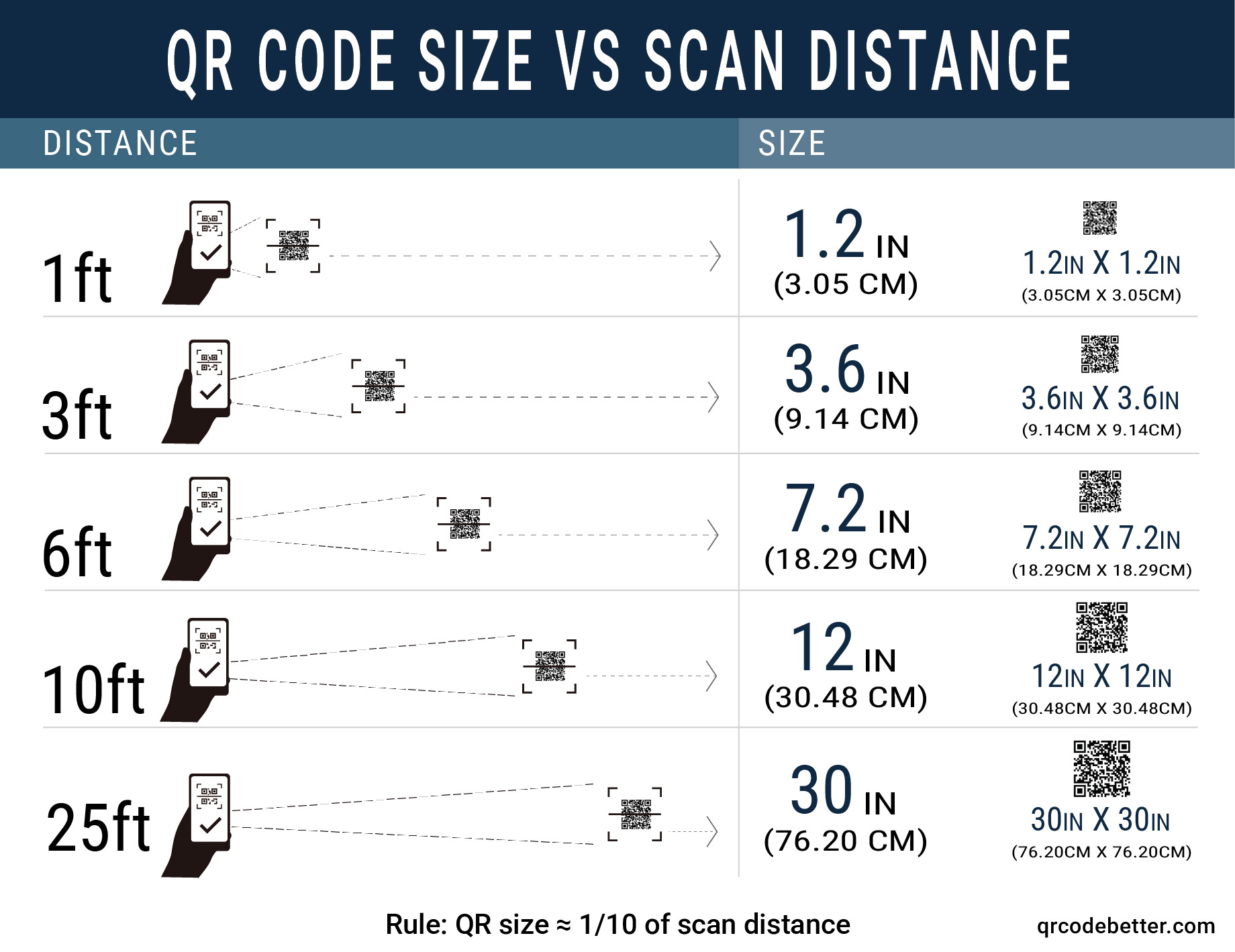
A simple rule of thumb: your QR code should be about 1/10 the distance from which it will be scanned. This is one of the easiest ways to size a QR code correctly in the real world instead of guessing.
- 10 feet away → 1 foot (12 in) QR code
- 5 feet away → 6 inch QR code
- 2 feet away → 2.4 inch QR code
- 1 foot away → about 1.2 inch QR code
If people have to step closer, tilt their phone, or try multiple times, your QR code is probably too small.
Estimate Minimum Size
Enter how far away people will stand when scanning your QR code. We will suggest a safe minimum size for print.
Example: people scan a poster from 6–8 feet away in a hallway.
This is a conservative estimate based on common print-quality guidelines. Always print a sample and test with multiple phones before launching.
Create a QR Code at the Right Size
Once you know your ideal size, generate a dynamic QR code that you can update without reprinting. Perfect for campaigns, menus, packaging, and more.
Open QR Code GeneratorTip: Export at high resolution (300 DPI for print) and keep plenty of white space around the QR code.
Add This QR Size Calculator to Your Website
Want to give your readers a free QR code size calculator? Copy the embed code below and paste it into any page on your site. The calculator works on desktop and mobile and links back to this guide.
Tip: click the box to select all, then copy and paste it into your website’s HTML.
Why QR Codes Fail to Scan
Size is the biggest issue, but it is not the only one. Even a correctly sized QR code can fail if the design or printing is poor.
- Too small: the most common problem by far
- Low contrast: light colors or colored backgrounds reduce readability
- Blurry output: low-resolution exports break scanning even if the code looks big enough
- Too much data: dense QR codes with long URLs are harder to scan at small sizes
- Poor placement: glare, curves, folds, and awkward angles all hurt usability
- No quiet zone: removing the white border to “save space” is one of the most common mistakes
If your QR code does not scan immediately, most people will move on. That means lost clicks, lost leads, and wasted print space.
How to Make Sure Your QR Code Scans Every Time
Getting the size right is only the start. These best practices make a major difference in scan success:
- ✓ Use at least 1 inch for close-range print like business cards
- ✓ Increase size based on scanning distance (the 10:1 rule)
- ✓ Use strong contrast — black on white works best
- ✓ Export in high resolution (300 DPI minimum for print)
- ✓ Leave enough white space (quiet zone) around the code
- ✓ Test the code in real conditions before printing in bulk
That last step matters more than people think. A code that looks fine on screen can still fail when printed too small or placed in a difficult spot.
Static vs Dynamic QR Codes: Does Size Matter Differently?
Size affects whether a QR code scans, but flexibility affects whether it stays useful after printing.
With a static QR code, the destination is locked once the code is created. If the link changes, the printed code becomes useless and you have to reprint everything.
With a dynamic QR code, you can update the destination without changing the printed code. Dynamic codes also tend to store shorter URLs, which means fewer modules, cleaner patterns, and more reliable scanning at smaller sizes.
That makes dynamic QR codes the better choice for business cards, flyers, product packaging, signs, and any campaign that may change over time.
Real-World Example
Imagine printing 1,000 business cards with a QR code that is just under 1 inch wide.
Some phones scan it. Others hesitate. Some people get it on the second try. Some give up. The code technically works, but not consistently enough to trust.
Now imagine that same card with a slightly larger QR code. The visual difference is small, but the performance difference is huge.
Chasing the smallest possible QR code is usually the wrong goal. A slightly larger code is almost always the better decision.
QR Code Size FAQs
What is the absolute smallest QR code size?
For most modern smartphones, going below about 0.8 inches (2 cm) on print becomes risky. If you must go smaller, keep the design extremely clean and test thoroughly before printing in bulk.
How far away can a QR code be scanned?
It depends on the phone camera, lighting, and size. A simple guideline is that the scan distance should not be more than 10 times the QR code’s width. Larger codes and higher contrast allow longer distances.
Does adding a logo change the minimum size?
Yes. Logos cover some of the modules, so the QR code must be bigger or use a higher error-correction level. Keep logos small and centered and increase the overall QR size to stay safe.
How big should a QR code be on a presentation slide?
Aim for at least 10–15% of the slide height and leave it on screen long enough for everyone in the room to scan. Test from the back of the room before presenting.
Can dynamic QR codes be smaller than static ones?
Dynamic QR codes usually store shorter URLs, which means fewer modules and cleaner patterns. That helps them scan more reliably at smaller sizes, but you should still follow the same safety rules.
Why does my QR code not scan?
The most common reason is that the code is too small for the scanning distance. Other causes include low contrast, blurry printing, too much encoded data, and poor placement near folds, curves, or glare.
Size It Right, Then Track Every Scan
Generate dynamic QR codes, see scan analytics, and edit destinations anytime without reprinting.
Generate a QR code and test different sizes before printing.
Use Dynamic QR Code GeneratorHelpful Guides on QR Code Printing & Tracking
Static vs Dynamic QR Codes: Which Should You Print?
Understand when to choose static codes versus editable dynamic codes for campaigns.
QR Codes in Print Advertising: Best Practices
Design, placement, and sizing tips for magazines, mailers, and posters.
QR Code Analytics: Track Scans Like Clicks
See how many people scan, where they are, and which campaigns perform best.
Related QR Code Solutions
Edit QR destinations anytime without reprinting.
Track scans, locations, devices, and campaigns.
Turn cards into digital contact hubs.
Perfect sizes for tablets, table tents, and wall menus.
Tickets, schedules, and feedback forms.
Create static and dynamic QR codes in seconds.