QR Code Analytics:
Track Every Scan, Not Just the Click
Most QR codes give you zero data. You don’t know if they worked, who scanned them, or if your campaign actually performed.
QR code analytics changes that. Instead of guessing, you see exactly what happens after someone scans your code — location, device, time, and more.
14-day free trial • No credit card required

What Is QR Code Analytics?
QR code analytics is the process of tracking what happens after someone scans your QR code. With a trackable QR code, you can see how many people scanned it, when they scanned it, where they were, and what device they used.
This only works with dynamic QR codes. Static QR codes encode the destination directly into the code itself — there is no redirect layer, which means there is nothing to track.
Bottom line:
If you want to know whether your QR codes are actually working, you need dynamic QR codes with built-in analytics. Static codes give you zero insight.
What Data Can You Track From QR Codes?
Every time someone scans a dynamic QR code, the following data is captured automatically:
Total scans
The total number of times your QR code has been scanned — across all time or filtered by date range.
Unique visitors
See how many distinct people scanned — not just total hits. Tells you reach vs repeat engagement.
Location — city, state, country
Know where your scans are coming from geographically. Useful for local campaigns, events, and distribution tracking.
Device & browser
iOS or Android, Safari or Chrome — know what your audience uses so you can optimize your landing page.
Scan date & time
Exact timestamp for every scan. Find out when people engage — morning, evening, day of week — and act on it.
Export to CSV
Download your full scan history as a CSV file for reporting, analysis, or sharing with your team or client.
This gives you a clear picture of how your QR codes are actually being used in the real world — not a guess, but real data you can act on.
Can You See Who Scans Your QR Code?
No. QR code analytics does not identify individuals. It shows aggregated data like location, device type, and time of scan — but not personal identity.
This keeps tracking useful while still respecting privacy. You see enough data to measure your campaigns without collecting anything personal about the people scanning.
How QR Code Tracking Works
When someone scans a dynamic QR code, they are briefly redirected through a tracking URL before reaching your destination. This allows the system to record the scan — simple, invisible, instant.
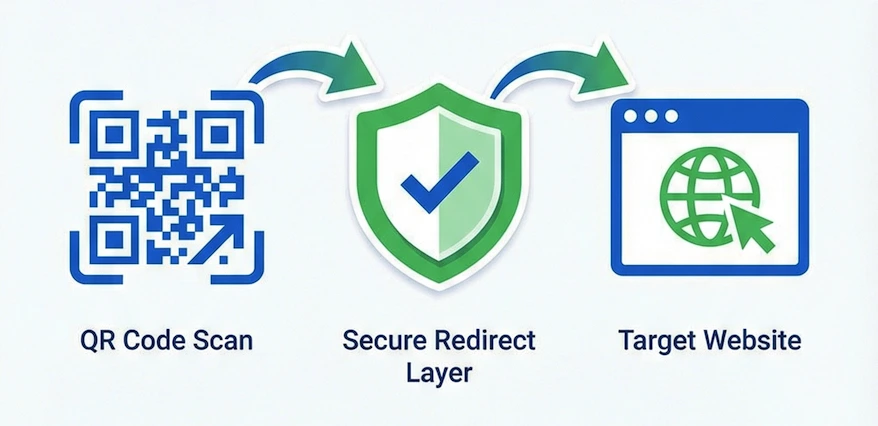
Someone scans your QR code
Their phone reads the QR code and hits the tracking URL — a short redirect link that you control.
The scan gets logged
Time, location, device, and browser are captured instantly. The person scanning doesn’t notice anything different.
They arrive at your destination
The redirect sends them to your URL — your website, menu, landing page, or vCard. Instant. No delay.
You see the data in your dashboard
Every scan appears in your analytics — total count, unique visitors, location, device, and exact timestamp.
Why Most QR Codes Give You Zero Insight
You print flyers. You put QR codes on business cards, posters, packaging. And then you have no idea if anyone scanned them. Without analytics, you are guessing.
No scan count
You don’t know if one person scanned it or a thousand. There’s no data at all.
No location data
Which city? Which neighborhood? Which event? Static QR codes can’t tell you anything.
No idea what’s working
Is the flyer campaign performing? Is the business card QR getting scanned? You have no way to know.
Wasted marketing spend
You’re spending money on print. Without scan data, you can’t measure ROI or make smarter decisions next time.
Without QR analytics, every print campaign is a guess.
Why QR Code Analytics Matters
Without tracking, you are guessing. You print a QR code, distribute it, and hope people scan it. But you have no idea if it worked.
With analytics, you can answer real questions:
Did people scan this at all?
Stop wondering. See the actual scan count for every QR code you create.
Which campaign performed best?
Compare scan data across locations, print materials, and distribution channels.
What time of day gets the most engagement?
Timestamps on every scan reveal when your audience is most active.
Are people actually following through?
See whether scans translate to real engagement or if your code is being ignored.
This turns QR codes from a static tool into a measurable marketing channel.
Here’s What You Actually See
Not a summary number. Not an estimate. Every scan, fully detailed — location, device, browser, and timestamp.
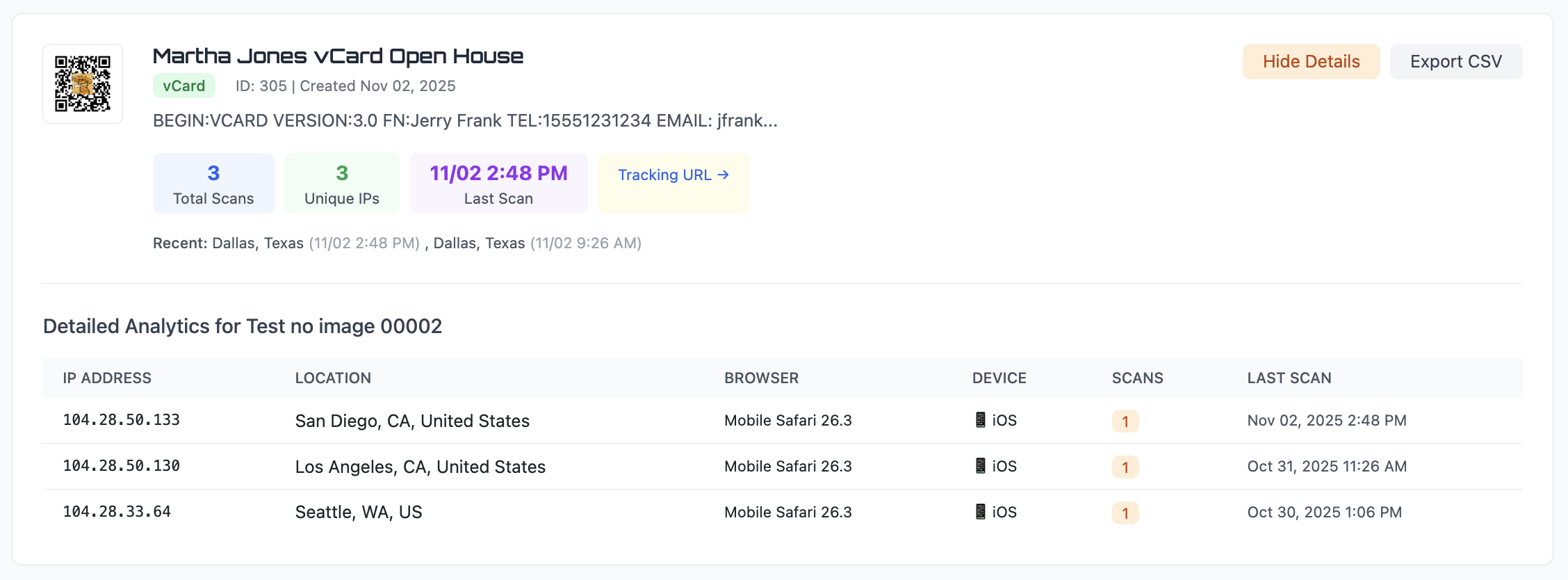
Per-scan detail
Each row shows exact city and state, browser version, device type, number of scans from that visitor, and the last scan time.
Summary at the top
Total scans, unique IPs, and last scan timestamp — visible immediately when you open any QR code’s detail view.
Export any time
Hit Export CSV and download the full scan history for any QR code. Take it into Excel, Google Sheets, or your reporting tool.
How to Track QR Code Scans
Tracking QR code scans requires dynamic QR codes. Each scan passes through a tracking URL that logs location, device, and time before redirecting the user to your destination.
Here is how to set it up:
Create a dynamic QR code
Use the dynamic QR code generator to create a trackable code linked to your destination.
Print or share it
Put it on flyers, business cards, packaging, posters, or share digitally. Make sure the QR code is large enough to scan reliably.
View scan data in your dashboard
Every scan appears automatically — total count, unique visitors, location, device, and exact timestamp. No setup required.
Why You Can’t Track Static QR Codes
Tracking requires a redirect layer. Static QR codes encode the destination directly — there’s nothing in between to log the scan. Dynamic QR codes are required for any analytics.
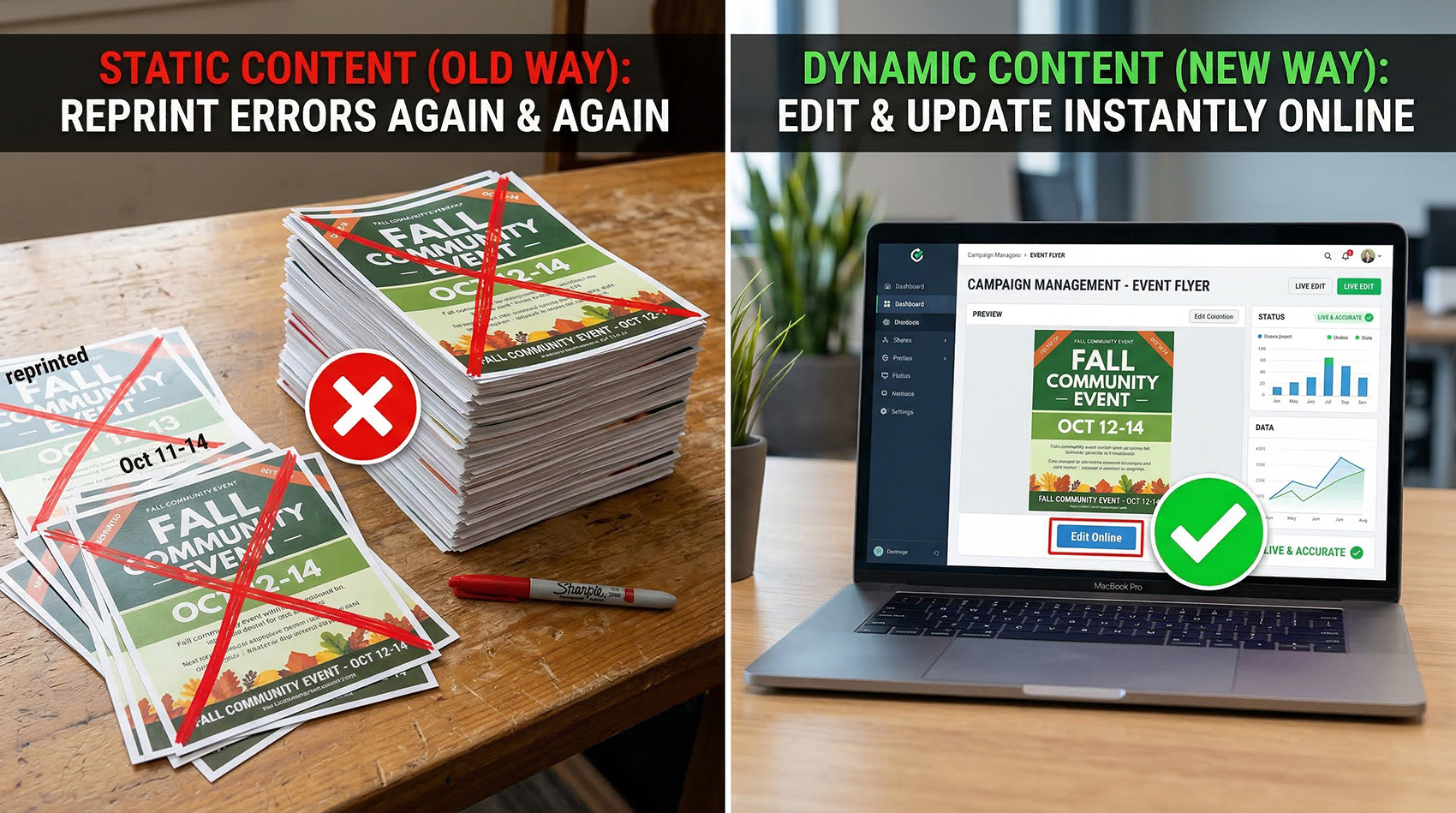
Static QR Codes
No tracking — destination is baked in, nothing to log
No scan count, no location, no device data
Can’t be edited after printing
Zero insight on whether your print materials work
Dynamic QR Codes
Full tracking — every scan logged with detail
Location, device, browser, timestamp per scan
Edit the destination anytime without reprinting
Measure every print campaign with real data
Real-World Example
Imagine placing QR codes on flyers in two different neighborhoods.
Without analytics, you have no idea which one performed better. You spent the same money on both and got… nothing. No data.
120
scans — Neighborhood A
35
scans — Neighborhood B
Now you know exactly where to focus your next campaign. That is the difference between guessing and deciding.
Change Your QR Code Without Reprinting
Analytics and editing go together. If your scan data shows a link isn’t working — or you need to update the destination — change it in your dashboard. The printed QR code stays the same.
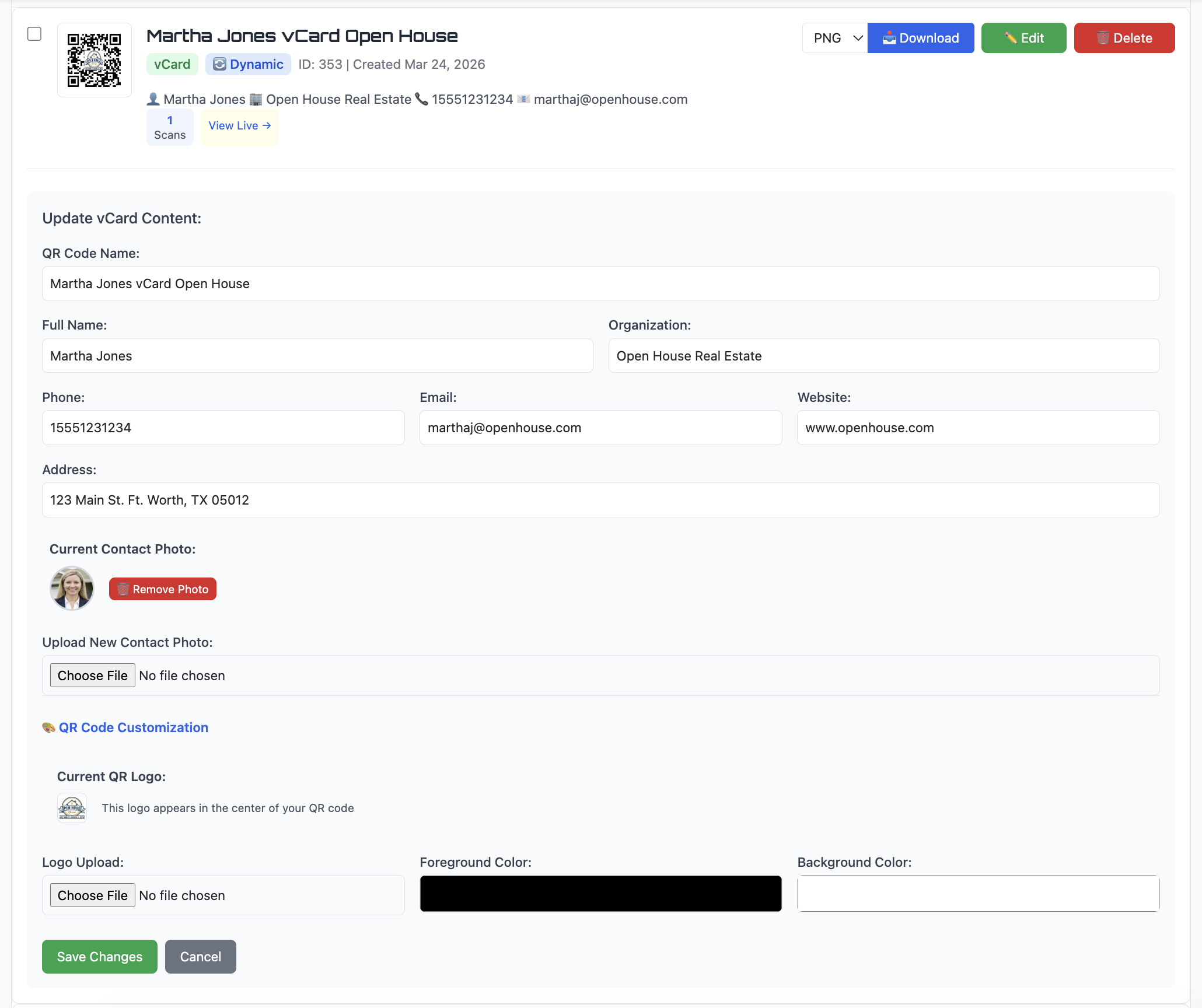
Update the destination
Wrong link? New campaign? Change it in seconds — no reprint needed.
Fix mistakes instantly
Typo in the URL? Update it before more people scan the wrong link.
Reuse printed materials
Point last year’s event flyer QR code at this year’s event. Same print, new destination.
How to Use QR Code Analytics Effectively
Collecting data is only useful if you act on it. Here is how to get the most out of your scan analytics:
Use different QR codes for different campaigns
One code per flyer, one per location, one per event. This gives you comparison data instead of one big number.
Track performance by location and channel
See which neighborhoods, events, or distribution channels drive the most scans and focus your budget there.
Adjust messaging based on scan data
If one call-to-action outperforms another, you’ll see it in the numbers. Let data guide your next print run.
Update destinations without reprinting
Campaign ended? Point the same QR code at a new landing page. The printed code stays the same.
Small changes based on real data can significantly improve results over time.
Who Uses QR Code Analytics
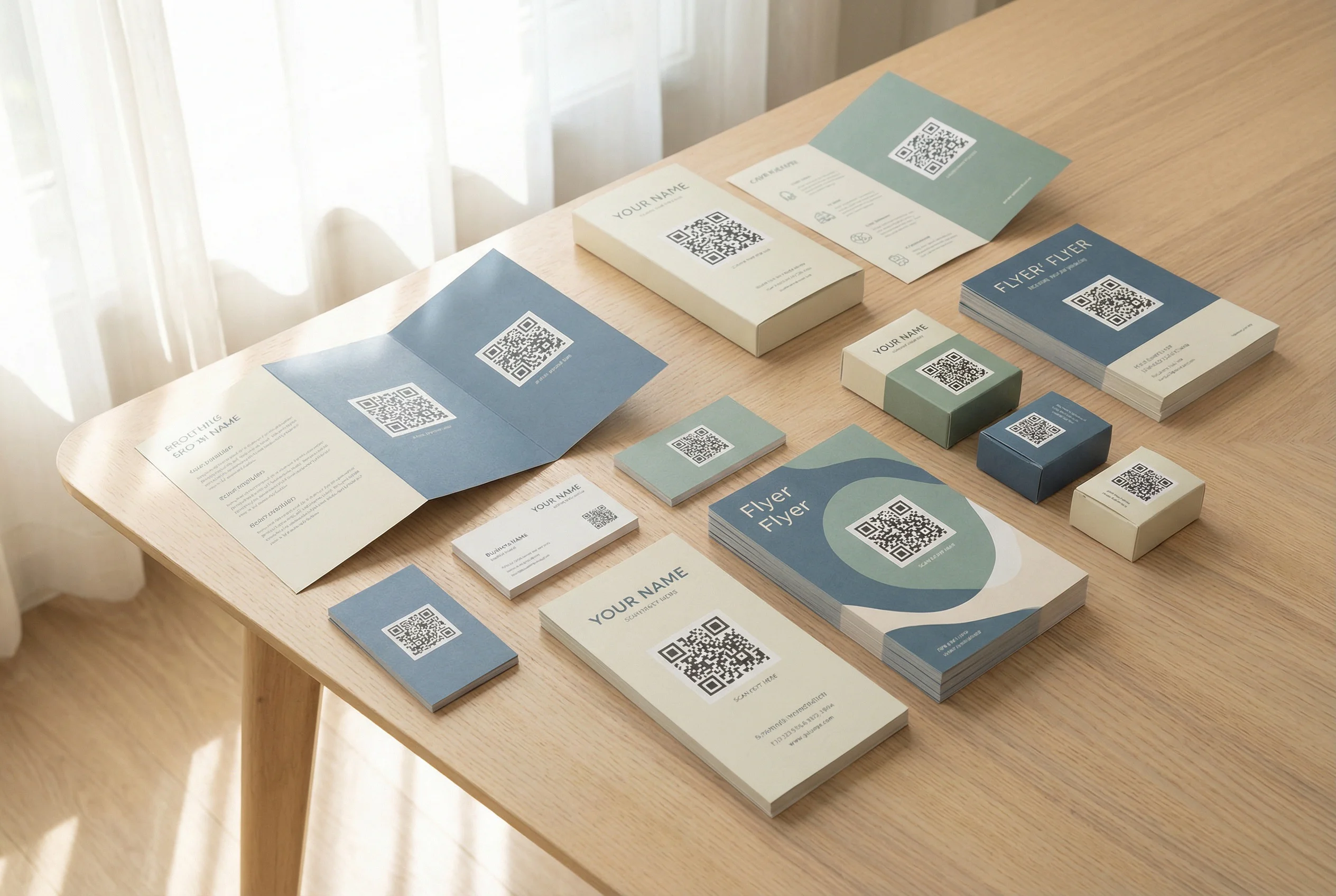
Marketing campaigns
Track which flyers, mailers, and posters drive scans. Stop guessing which print channels perform.
Print advertising
Measure magazine ads, direct mail, and outdoor signage. Prove ROI on print spend with actual scan data.
Events & conferences
Track badge, program, and signage scans in real time. See engagement spikes as they happen.
Product packaging
Know how many customers scan your packaging QR code, and from where. Update the destination when products change.
Business cards
Know how many people actually scanned your card after meeting you. See which events drive the most follow-through. See vCard QR codes →
Common Mistakes With QR Code Tracking
A QR code is only useful if it both scans reliably and provides meaningful data. These are the mistakes that prevent both:
- ✗ Using static QR codes and expecting analytics
- ✗ Making the code too small to scan reliably
- ✗ Not testing before printing — one bad batch wastes the whole run
- ✗ Using the same code for everything — no comparison data
- ✗ Ignoring the data after collecting it — analytics only matter if you act on them
- ✗ Low contrast or busy backgrounds that make scanning unreliable
Start Tracking Your QR Codes Today
Real scan data. No guessing. No Google Analytics required.
Create dynamic QR codes with built-in analytics and see every scan as it happens.
No credit card required • Dynamic QR codes included • Cancel anytime
Common Questions About QR Code Analytics
Can QR codes be tracked?
Yes — but only dynamic QR codes. Static QR codes encode the destination directly with no redirect layer, so there’s nothing to log. Dynamic QR codes use a redirect URL that captures scan data before sending the user to your destination.
Do I need Google Analytics to track QR codes?
No. QR Code Better tracks scans natively — no Google Analytics setup, no UTM parameters, no third-party integrations required. Everything is built in.
Can I track the location of QR code scans?
Yes. Every scan is logged with city, state, and country based on the scanner’s IP address. You can see exactly where your scans are coming from in your analytics dashboard.
Can I see who scanned my QR code?
No. QR code analytics does not identify individuals. It shows data like location, device type, and time of scan, but not personal identity. Tracking is useful for measuring campaigns while still respecting privacy.
Can I edit the QR code destination after printing?
Yes. Dynamic QR codes let you update the destination URL anytime from your dashboard. The printed QR code stays exactly the same — no reprint needed.
Is QR code scan tracking real-time?
Yes. Scans appear in your dashboard as they happen. You can watch engagement during a live event, check results immediately after distributing flyers, or monitor a campaign as it runs.
Can I export my scan data?
Yes. Every QR code’s analytics can be exported to CSV — full scan history with IP, location, browser, device, and timestamp. Download it anytime from your dashboard.