QR Code for Event Check-In (Faster Entry, Real-Time Attendance Tracking)
Use QR codes to speed up event check-in, registration, and attendee access. Instead of manual lookups or long lines, attendees scan and instantly pull up their details.
Track who actually shows up, when they arrive, and how your check-in process performs. See full details in our QR code analytics guide. Update links anytime without reprinting tickets, badges, or signage.
A QR code for event check-in makes registration faster, reduces lines, and gives you real-time attendance tracking.
Perfect for conferences, trade shows, workshops, fundraisers, and any event with registration or entry control.
Create Your Event Check-In QR Code
What happens when someone scans at check-in?
1. They arrive at the event — with a ticket, email, or badge
2. They scan the QR code — no searching or waiting
3. Their info loads instantly — registration, ticket, or instructions
4. Entry is confirmed — faster than manual check-in
5. You track attendance — know exactly who showed up and when

Event check-in is slower than it should be
Manual check-in creates lines, confusion, and delays. Staff search for names, attendees wait, and the first impression of your event suffers.
Long lines at registration tables
Attendees waiting for manual lookup
Errors in check-in tracking
No clear data on attendance
QR code check-in solves this instantly.
Staff can also scan attendee QR codes to verify access instantly, reducing manual work and errors.
Where QR codes improve event check-in
Any event with registration or entry control runs faster with QR code check-in.
📋 Event registration desks
🎤 Conference check-in
🏢 Trade show entry
📚 Workshop attendance
⭐ VIP or staff access
🏷️ Badge pickup stations
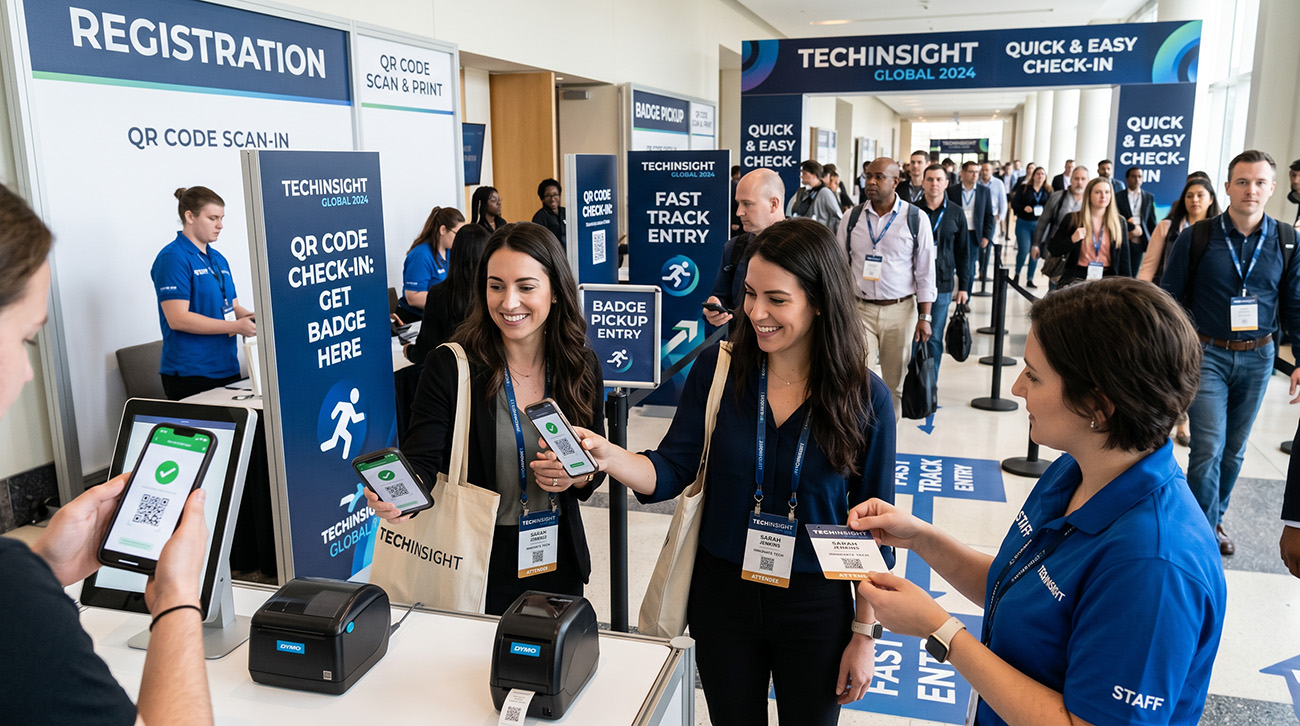
QR code check-in vs manual check-in
Manual check-in
- • Slow lines and wait times
- • Manual name lookup
- • Errors in attendance tracking
- • No real-time data
QR code check-in ✓
- • Instant scan access
- • Faster entry for attendees
- • Accurate attendance tracking
- • Real-time analytics
The difference is immediate. Events that switch to QR code check-in eliminate the bottleneck at the door and start with a better first impression.
What your event check-in QR code links to
Your QR code can point to whatever makes check-in fastest for your specific event.
Registration page
Let attendees access their registration details instantly — name, ticket type, session selections.
Ticket or badge info
Display entry credentials or check-in confirmation on their phone screen.
Event instructions
Share schedules, venue maps, parking directions, or session details on arrival.
Check-in form
Capture attendee arrival data — name, company, contact info — without paper forms.
Digital badge
Let attendees display their badge or access pass on their phone instead of printing.
Contact or follow-up
Collect leads at check-in or send post-event info. See our vCard QR code generator for contact sharing.
Track attendance in real time
Every scan is recorded so you know exactly how many people checked in, when they arrived, and how your event performed.
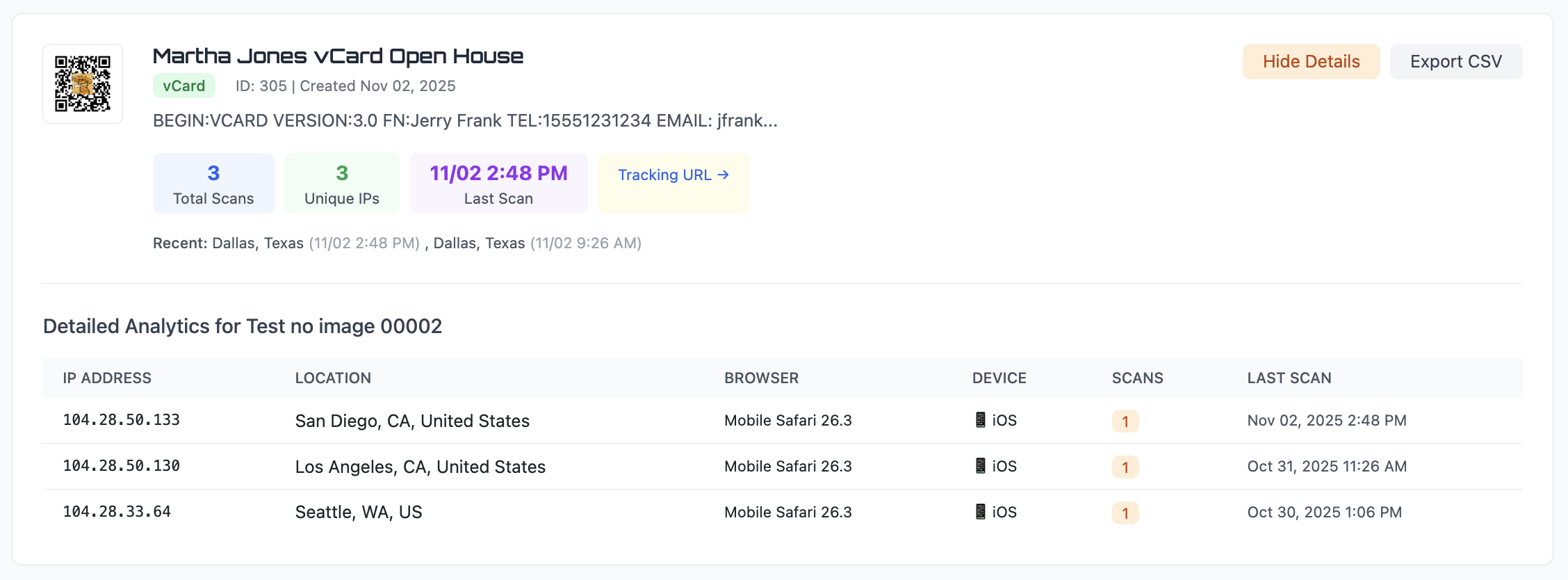
Total check-ins — see exactly how many attendees arrived
Arrival times — know when the rush hits and when it slows
Location data — useful for multi-venue or multi-entrance events
Device info — understand how attendees are scanning
Export attendance data to CSV anytime. Share reports with stakeholders or use them to plan your next event, or learn more in our QR code analytics guide.
You can also create separate QR codes for different entrances, registration desks, or event days to see exactly where attendees are coming from and when peak traffic happens.
Static vs dynamic QR codes for events
For events, dynamic is almost always the right choice.
Static QR code
The URL is permanent. If you need to change the check-in page, update instructions, or redirect after the event, the QR code still points to the old link.
Best for: one-time events where nothing will change.
Dynamic QR code ✓
Change the destination anytime. Update check-in instructions, redirect to post-event surveys, or reuse the same QR code for your next event — without reprinting badges or signage.
Best for: conferences, recurring events, and any event where plans may change.
Learn more about the differences in our static vs dynamic QR code guide.
Event Check-In QR Code FAQs
How do I use QR codes for event check-in?
Create a QR code that links to your registration page, ticket confirmation, or check-in form. Print it on badges, signage, or include it in confirmation emails. Attendees scan on arrival for instant check-in.
Can I track who checked in at my event?
Yes. Every scan is logged with the date, time, approximate location, and device type. You can see exactly how many people checked in and when they arrived. Export the data to CSV for your records.
Can I update the QR code after printing badges or signage?
Yes. With a dynamic QR code, you can change the destination URL anytime. Update event instructions, swap to a different check-in page, or redirect after the event — without reprinting.
What should an event check-in QR code link to?
Common destinations include a registration confirmation page, check-in form, ticket details, event instructions or schedule, digital badge, or a contact collection form.
How big should the QR code be on event signage?
At least 3–4 inches wide for standing signage where attendees are 3–6 feet away. For badges, at least 1 inch wide. See our QR code size guide for details.
Can I use a QR code for event registration and check-in?
Yes. The same QR code can be used for event registration, confirmation, and check-in. With dynamic QR codes, you can update the destination as your event changes without reprinting anything.
Create your event check-in QR code
Generate a QR code for event check-in in seconds. Speed up entry, track attendance, and eliminate lines at registration.
Open QR Code GeneratorLooking for other ways to use QR codes in your business? See our QR code marketing guide.