Free QR Code Maker
Create. Edit. Track.
Make QR codes for URLs, vCards, WiFi, email, SMS, and text — in seconds. Add your logo and brand colors. Dynamic codes can be edited after printing and track every scan with location, device, and time data.
14-day free trial • No credit card required • Up to 5 dynamic QR codes
6 QR Code Types — All Free to Try
Every type supports custom logo, custom colors, and downloads in PNG, SVG, and PDF.
URL
Link to any website. Dynamic codes let you change the destination after printing — no reprints, no wasted materials.
vCard
Digital business card with your name, phone, email, company, website, address, and photo. One scan saves everything to their phone.
WiFi
Guests scan and connect to your WiFi automatically. No more spelling out passwords. Supports WPA, WEP, and open networks.
Pre-fill the recipient, subject, and body. One scan opens a ready-to-send email on their phone.
SMS
Pre-fill a phone number and message. One scan opens the text ready to send — great for opt-ins and quick responses.
Text
Encode plain text — serial numbers, instructions, coupon codes, or any information you want someone to have on scan.
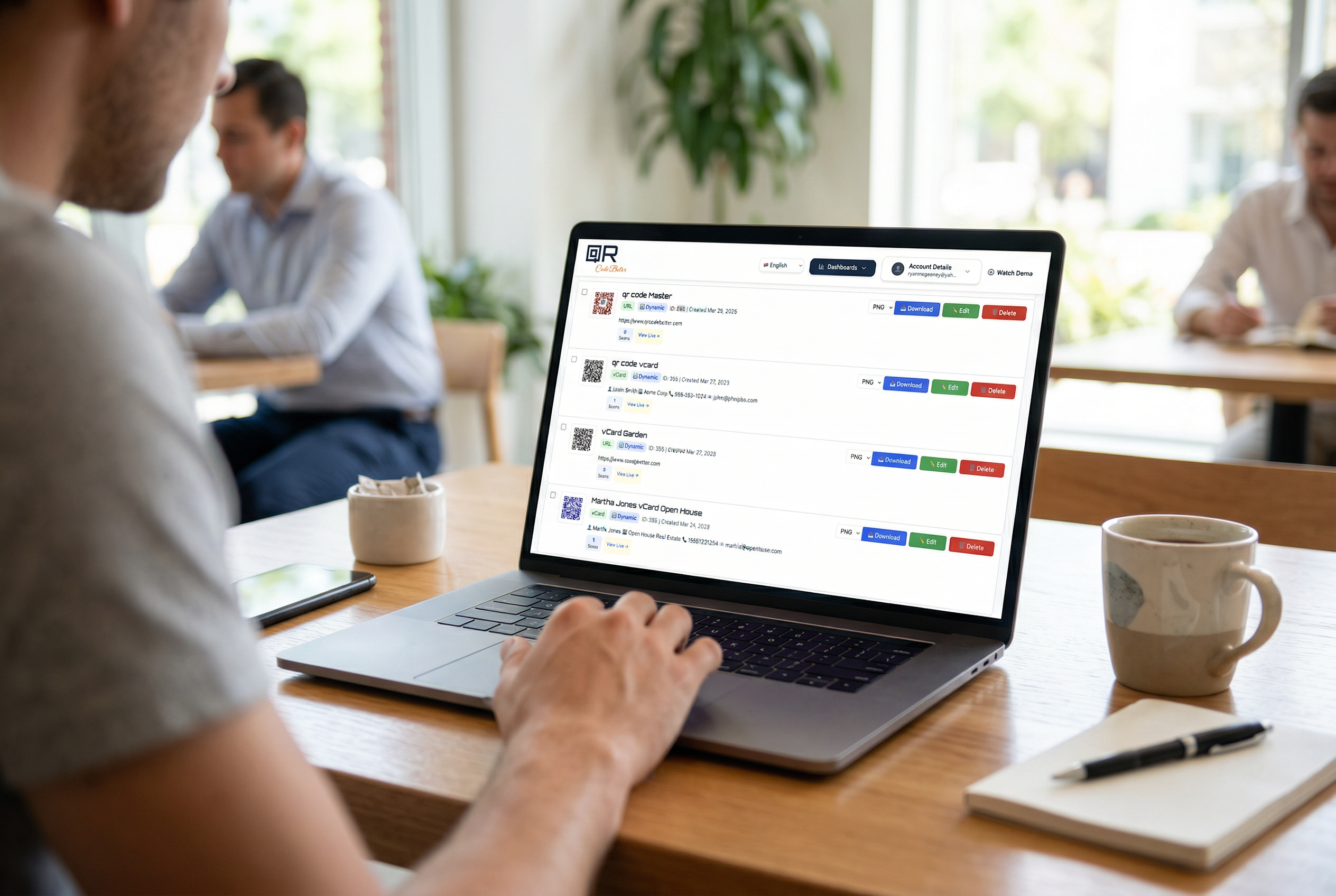
All Your QR Codes in One Dashboard
Every QR code you create is saved to your account. From your dashboard, you can download in multiple formats, edit the destination, view scan analytics, and delete codes you no longer need. No hunting through folders — everything lives in one place.
Download as PNG, SVG, or PDF anytime
Edit destination URLs and vCard details after creation
See scan counts at a glance for every QR code
Add your logo and custom brand colors
Static vs. Dynamic — Know the Difference
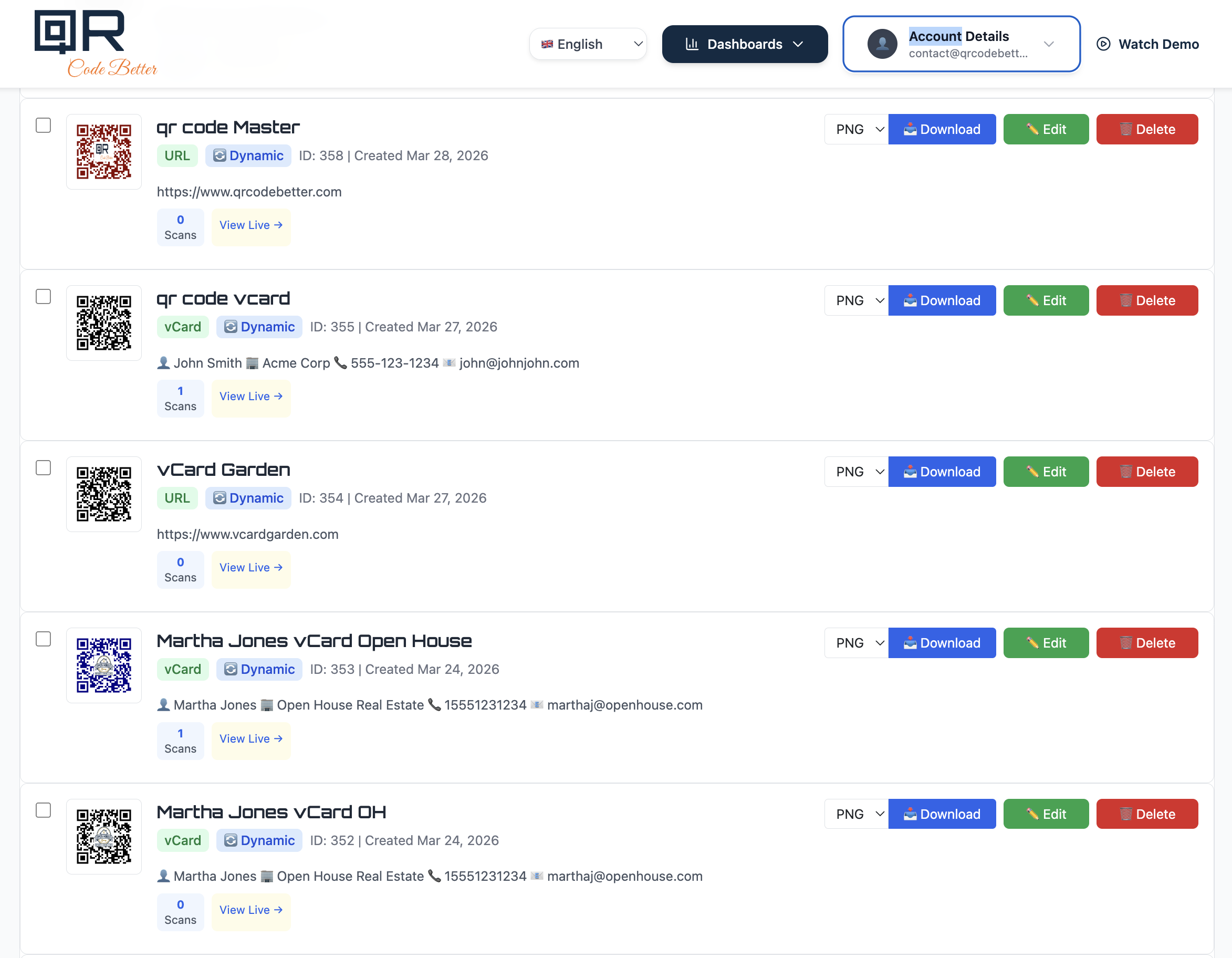
A static QR code bakes the URL directly into the pattern. It works forever and doesn't need the internet to resolve, but it can never be changed and has no tracking. A dynamic QR code routes through a redirect — you can change where it goes anytime and see exactly who scanned it, where, and when.
For personal use or permanent links, static is fine. For business, marketing, or anything you might need to update — dynamic is the only way to go.
Static
Dynamic ⭐
Edit After Printing — The Feature That Pays for Itself
You printed 5,000 flyers and then noticed a typo in the URL. Or the promotion ended and the QR code goes to a dead page. With a static code, your only option is to reprint everything.
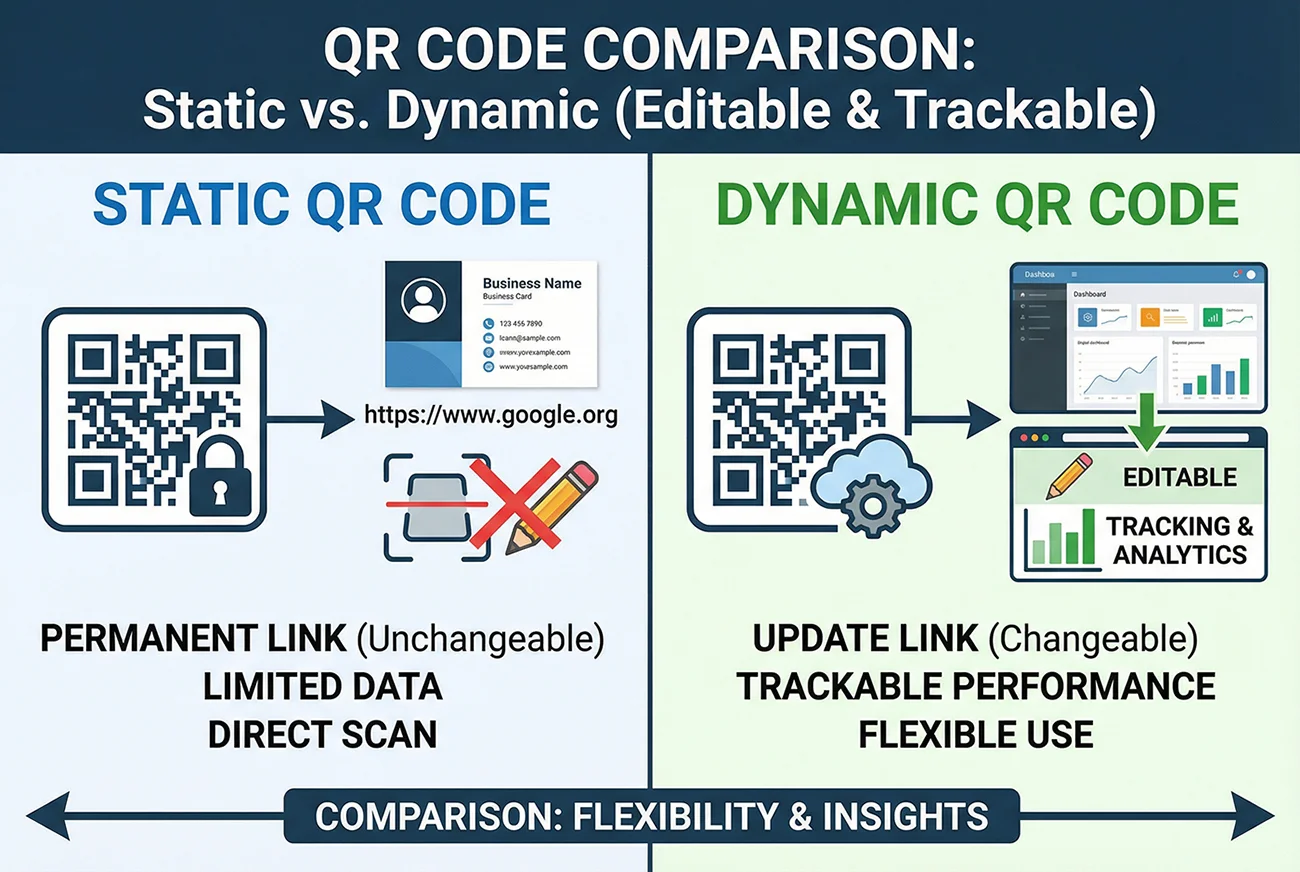
With a dynamic QR code from QR Code Better, you log in, change the destination, and save. Done — 10 seconds. The printed QR code stays the same. It just points to the new URL. Change it as many times as you want. Forever.
This works for URLs, vCard contact details, and any other QR type. Update your phone number, swap a landing page, redirect a seasonal campaign to a new offer — all without reprinting a single thing.
Know Exactly Who Scanned and Where
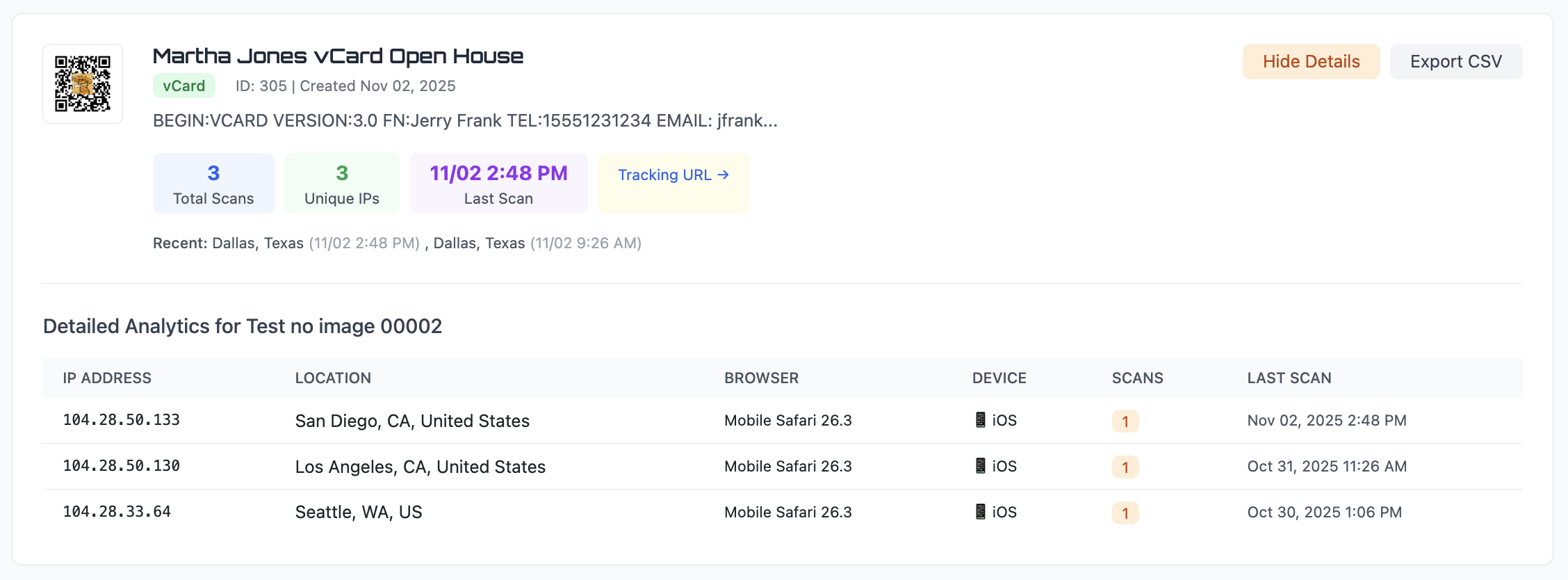
Every dynamic QR code tracks scans in real time. You printed flyers in three cities — now you can see which city responded. You put a QR code on your business card — now you know how many people actually saved your contact after the conference.
Your analytics dashboard shows total scans, unique visitors, the city and country of every scan, device type (iPhone, Android, desktop), browser, IP address, and exact timestamps. Export everything to CSV for your own reports.
Total scans and unique visitors
City-level location tracking
Device, browser, and OS breakdown
Export to CSV for custom reporting
Where People Use QR Codes
QR codes bridge the gap between physical and digital. Anywhere you have a printed surface and want someone to take an action on their phone — that's a QR code opportunity.
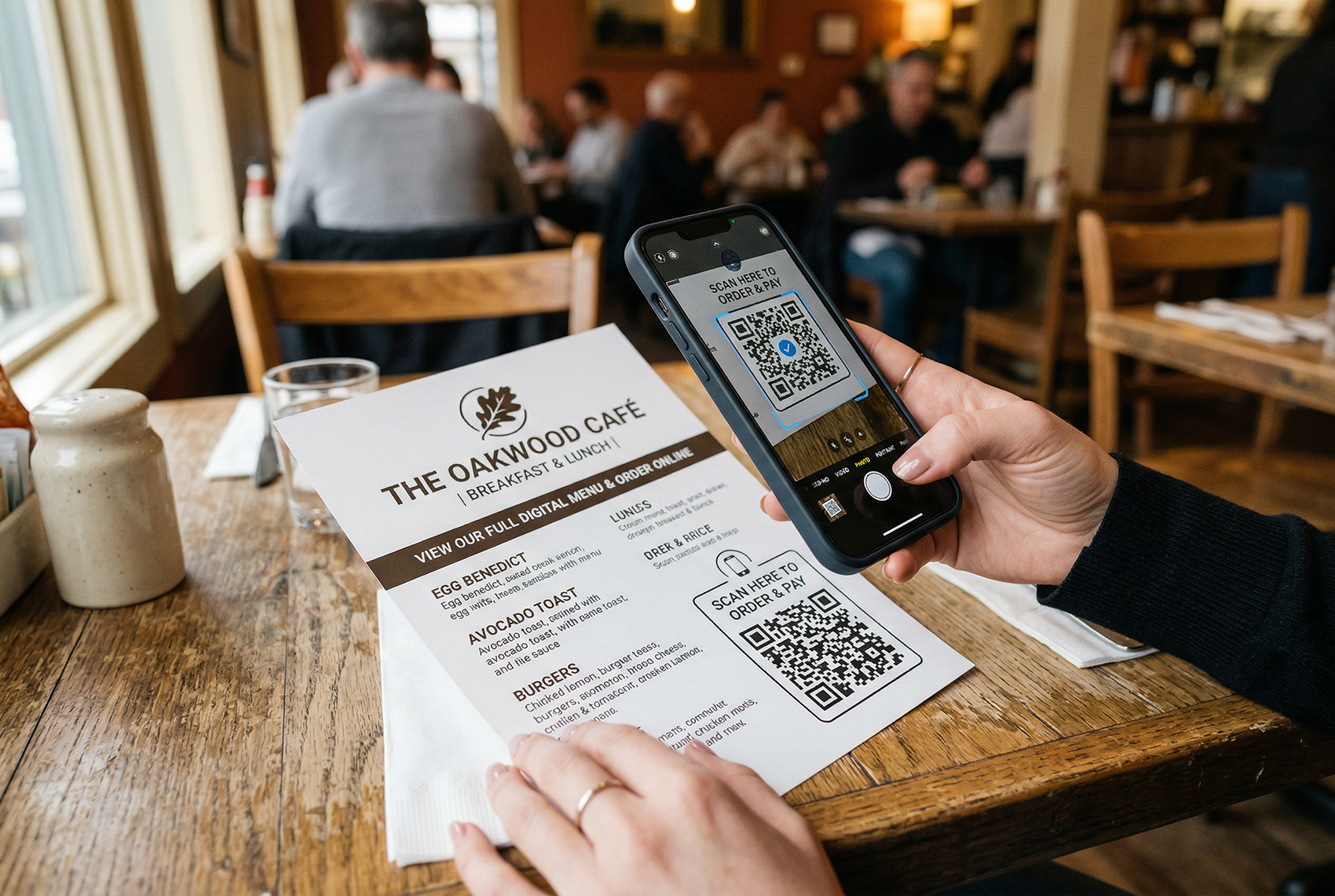
Restaurant menus
Update prices and specials without reprinting. Track which tables scan most.
Flyers and brochures
Measure campaign ROI. Redirect seasonal promotions without new prints.
Business cards
vCard QR codes save your full contact info with one scan. Include your photo.
Product packaging
Link to setup guides, warranty registration, or exclusive offers.
Real estate signs
Property details, agent contact, virtual tour — all from a yard sign scan.
Events and trade shows
Track booth engagement. Share schedules. Collect leads from badge scans.
Simple, Honest Pricing
Static
Up to 10 static QR codes. Works forever once downloaded. No editing, no tracking.
Starter
Up to 10 dynamic QR codes. Editable anytime. Basic scan tracking. Logo and colors.
Pro
Up to 40 dynamic QR codes. Advanced analytics with location and device data. CSV export.
Business
Up to 100 dynamic QR codes. All Pro features. Built for teams and high-volume use.
All plans include a 14-day free trial • No credit card required • Cancel anytime
Why QR Code Better Is Different
Most free QR code tools are one of two things: either they generate a plain black-and-white code and call it done, or they lock every useful feature behind a paywall. The free tier gives you a PNG download with no ability to edit, no analytics, and no branding. The moment you want to add a logo, track scans, or change the destination, you're looking at $30+ per month on enterprise platforms with features you'll never use.
We built QR Code Better to sit in the gap. You get the features that actually matter — editing after printing, scan analytics, logo and color customization, multiple download formats — at prices that make sense for small businesses, freelancers, and solo operators. Our most popular plan is $25 per month for up to 40 dynamic QR codes with full analytics. Most businesses need one.
No Learning Curve
Sign up, pick a QR type, enter your data, customize the look, and generate. The whole process takes under two minutes. If you can fill out a form, you can create a professional QR code. No design skills required. No tutorials needed.
vCard QR Codes with Contact Photos
Our vCard QR codes include something most generators skip — a contact photo. When someone scans your code, your headshot is embedded in the contact that saves to their phone. When you call, they see your face and company name instead of "Unknown Caller." This matters for sales, real estate, freelancing, and any business where personal trust drives revenue.
Built for People Who Print Things
If you're putting QR codes on menus, flyers, business cards, packaging, signs, vehicle wraps, or event materials, dynamic codes save you real money. One URL typo on 10,000 flyers costs hundreds to reprint. With a dynamic code, you fix it in 10 seconds from your phone. That one feature pays for the entire year of service the first time you use it.
Transparent and Fair
Your QR codes stay active for 30 days after cancellation. You can export your analytics anytime. We don't gate basic features behind expensive tiers. We don't run ads. We don't sell your data. The product pays for itself — that's the entire business model.
Common Questions
Is this QR code maker really free?
Yes. You get a 14-day free trial with up to 5 dynamic QR codes — no credit card required. Dynamic codes are editable and trackable. After the trial, plans start at $5/month for static codes or $10/month for dynamic codes with analytics.
What types of QR codes can I create?
Website URLs, vCards (digital business cards with contact photo), WiFi network credentials, email addresses with pre-filled subject and body, SMS messages, and plain text.
Can I edit the QR code after printing it?
Yes — with a dynamic QR code. Change the destination URL, update vCard contact details, or modify any content from your dashboard. The printed QR code image stays the same.
What scan analytics do I get?
Every scan records the city and country, device type (iPhone, Android, desktop), browser, IP address, and exact timestamp. View it in your dashboard and export to CSV.
Can I add my logo to the QR code?
Yes. Upload a JPG or PNG logo and it gets placed in the center of the QR code. You can also customize foreground and background colors to match your brand.
What download formats are available?
PNG for screens and social media. SVG for print shops and vector editing. PDF for documents and handouts. All included with every QR code.
Do the QR codes expire?
No. Your QR codes work as long as your account is active. Dynamic codes stay active for 30 days after cancellation, giving you time to transition. Static codes work forever once downloaded.
What's the difference between static and dynamic?
Static codes bake the URL into the pattern — permanent, no tracking, no editing. Dynamic codes use a redirect — editable anytime, full scan analytics, location and device tracking. For business use, dynamic is almost always the better choice.
Ready to Make Your First QR Code?
Free for 14 days. No credit card. Up to 5 dynamic QR codes with full analytics.
No credit card required • Cancel anytime • 30-day code retention after cancellation