QR Code Security: How to Protect Yourself from QR Phishing (Quishing)
QR codes are everywhere — restaurant menus, parking meters, event posters, product packaging, email signatures. Most people scan them without a second thought. And that's exactly what scammers are counting on.
The term for it is "quishing" — QR code phishing. Instead of sending you a suspicious email link, attackers put a malicious QR code in the physical world (or in emails and documents) and let your trust in the medium do the rest. You scan the code expecting a menu or a parking payment page, and instead you land on a fake login page designed to steal your credentials, a malware download, or a payment form that sends money to the wrong place.
This isn't hypothetical. QR code scams have surged since 2023, with the FBI, FTC, and cybersecurity firms all issuing warnings. As QR code usage grows — projected to reach over 100 million scanners in the US alone by 2026 — so does the attack surface.
This guide covers how quishing works, the most common scam types, how to protect yourself as a scanner, and how to protect your customers if you're a business using QR codes.
How quishing works
Traditional phishing relies on getting you to click a link in an email or text message. Most people have learned to be at least somewhat cautious about suspicious links — checking the sender, hovering over URLs, looking for obvious red flags.
QR codes bypass all of that. You can't "hover over" a QR code to preview the URL. You can't see where it leads until after you've scanned it. And because QR codes are associated with legitimate businesses and official signage, people tend to trust them implicitly.
Attackers exploit this trust in several ways:
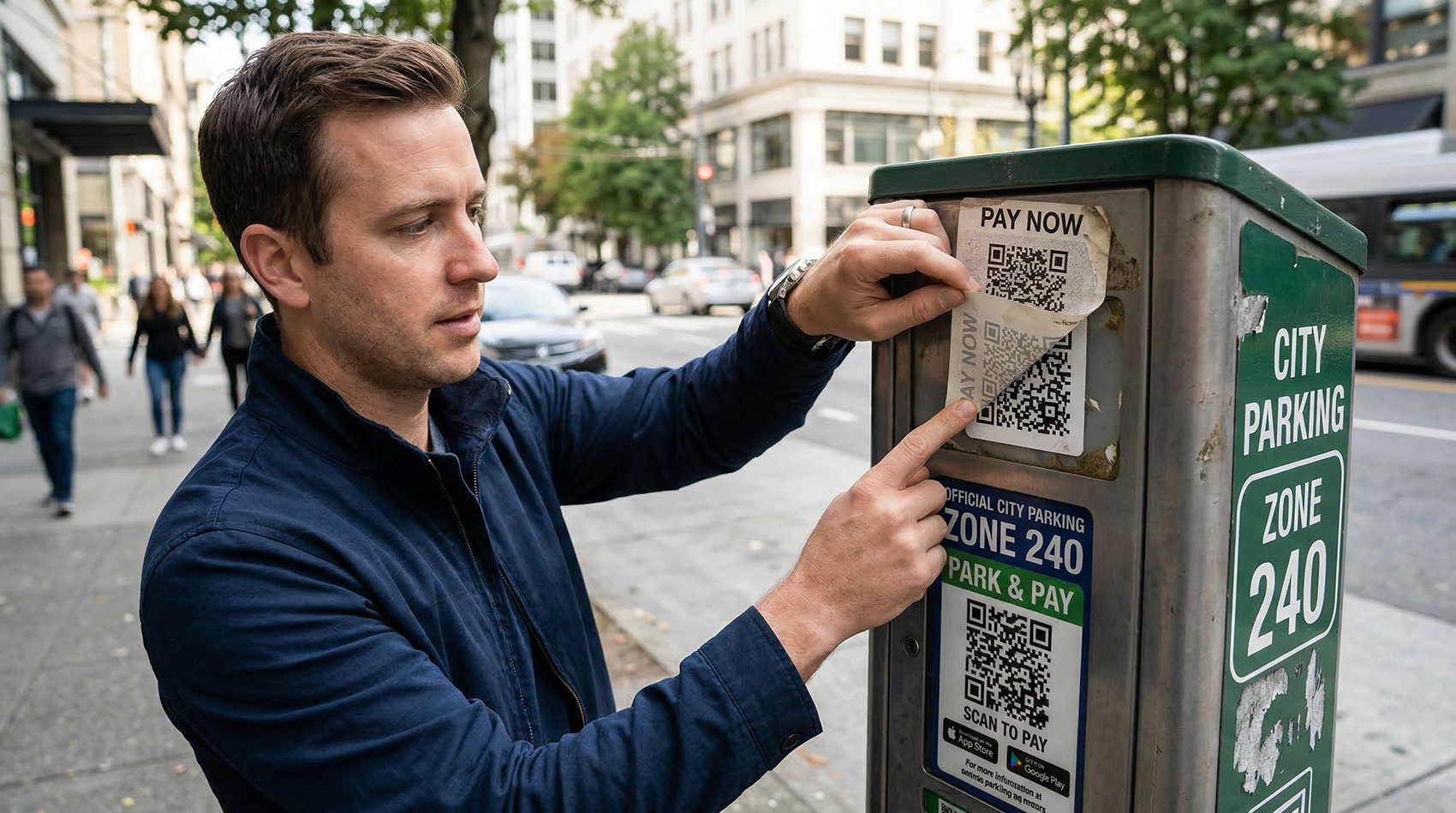
Physical sticker overlay. This is the most common real-world attack. A scammer prints a QR code sticker and places it over a legitimate QR code — on a parking meter, a restaurant table tent, a public transit sign, or a bulletin board. The victim scans what they think is the official code and ends up on the attacker's page instead. The original code is still underneath, completely hidden by the sticker.
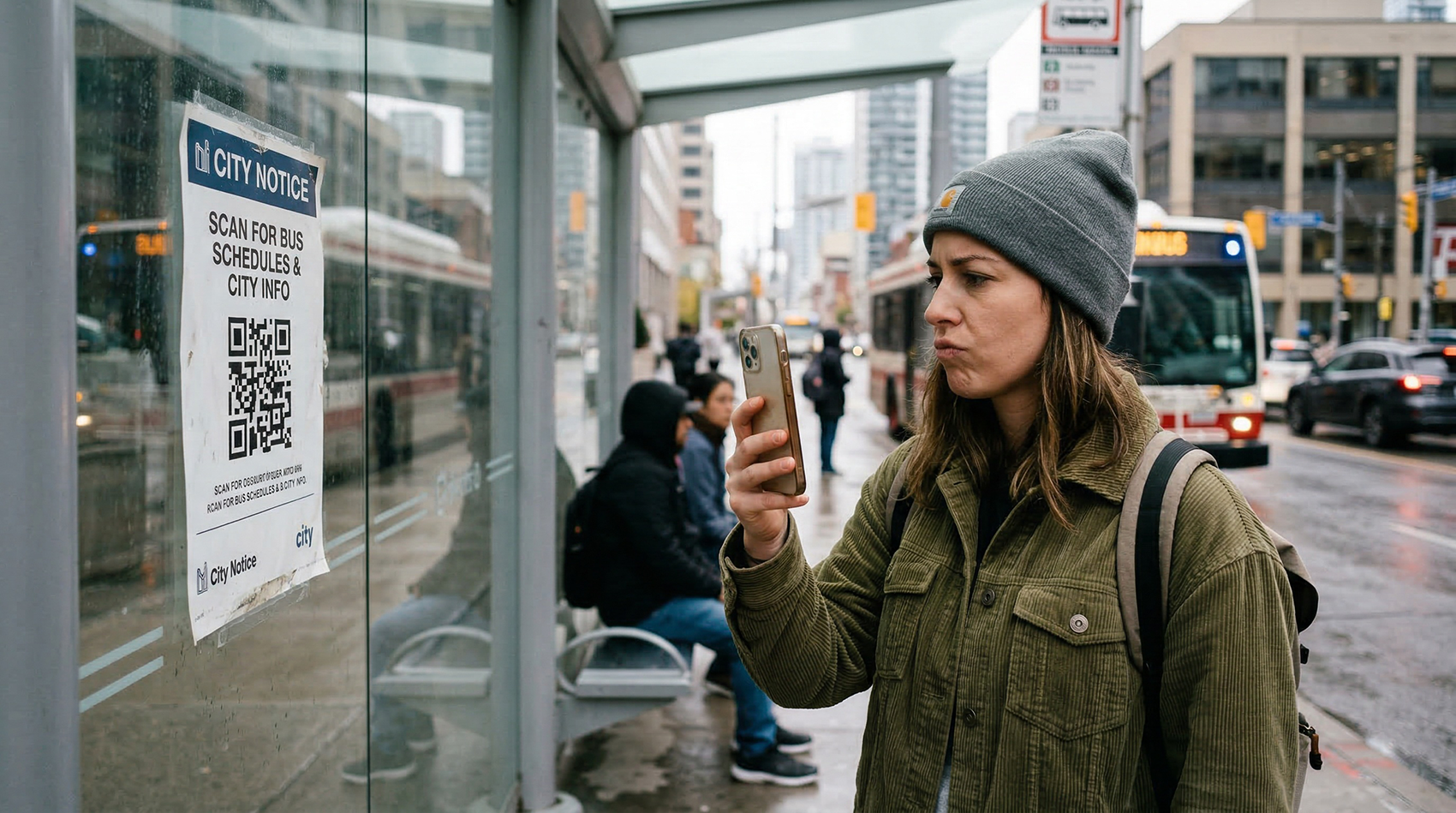
Fake signage. Rather than covering an existing code, the attacker creates entirely new signage that looks official. A professional-looking "Scan to Pay" sign near a parking lot. A "Free WiFi — Scan to Connect" poster in a public space. A "Scan for Discount" flyer on a store window. The signage looks legitimate, but the QR code leads to a malicious destination.
Email and document quishing. Attackers embed QR codes in phishing emails, knowing that email security filters are good at detecting malicious links but often can't analyze the destination encoded in a QR code image. The email says "Scan this QR code to verify your account" or "Scan to view your invoice," and the code leads to a credential-harvesting page.
Tampered digital codes. QR codes in shared documents, PDFs, or social media posts can be swapped or edited to point to malicious destinations. This is especially risky in documents that get forwarded or shared widely — the original creator may have used a legitimate code, but someone along the chain altered it.
The most common QR code scams
Knowing the specific scam types helps you recognize them before you become a victim:
Fake parking payment. This is the scam that made national news. Scammers place stickers over QR codes on parking meters and pay-to-park signs. Victims scan the code thinking they're paying for parking, but they're actually entering their credit card information on a fake payment page. The scammer collects the card data, and the victim also gets a parking ticket because they never actually paid. Cities across the US — including Austin, Houston, and San Antonio — have issued public warnings about this specific attack.
Credential harvesting. The QR code leads to a page that looks like a login screen for a familiar service — your bank, Microsoft 365, Google, or your company's VPN. You enter your username and password, which go straight to the attacker. The page may even redirect you to the real login page afterward, so you think you just had a normal login and don't realize your credentials were stolen.
Malware delivery. On Android devices especially, a QR code can lead to a page that prompts you to download an app or file. If you approve the download, you may be installing malware — spyware, keyloggers, or banking trojans. iOS is more restrictive about sideloading apps, but users can still be tricked into installing malicious configuration profiles.
Payment redirect. For businesses that accept payments via QR code (common for small vendors, food trucks, and service providers), an attacker can replace the business's payment QR code with one that routes payments to the attacker's account. The business doesn't realize the code was swapped, and the attacker collects payments until someone notices.
WiFi network hijacking. A malicious WiFi QR code can connect your phone to a rogue network controlled by the attacker. Once connected, the attacker can potentially intercept your traffic, redirect you to fake websites, or attempt to exploit vulnerabilities on your device. This is particularly dangerous in public spaces where people expect free WiFi.
How to protect yourself when scanning QR codes
You don't need to stop scanning QR codes. You just need to scan smarter. Here are the habits that protect you:
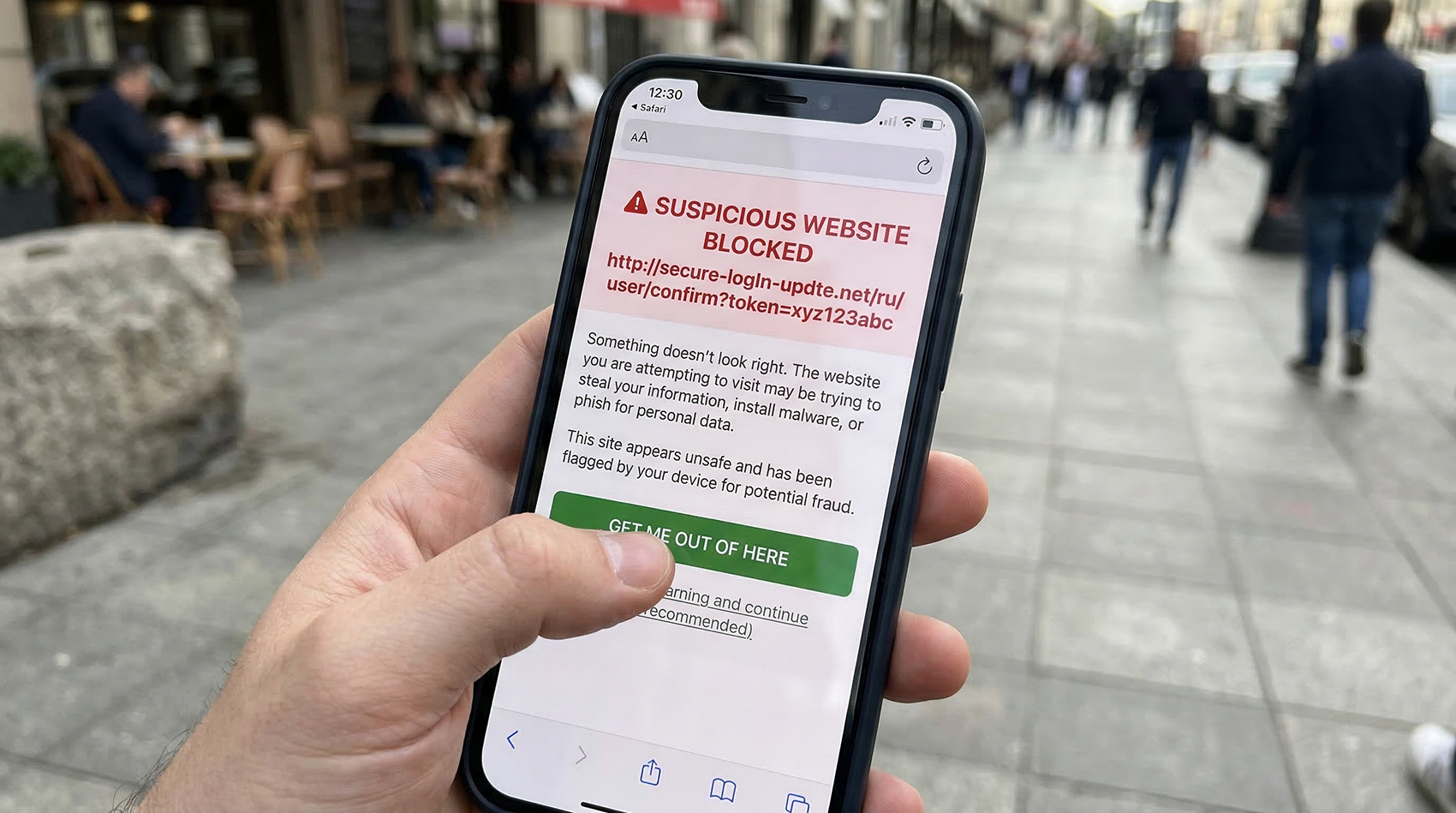
Preview the URL before opening it. Both iPhone and Android show you the URL a QR code leads to before you tap to open it. On iPhone, the camera app displays a banner with the URL at the top of the screen. On Android, Google Lens shows the URL before navigating. Read this URL carefully. If you're scanning a code at a restaurant and the URL is totally-not-a-scam.xyz/login instead of the restaurant's actual domain, don't tap it.
Look for signs of tampering. Before scanning a QR code in a public space, look at it closely. Is it a sticker placed on top of another code? Are the edges peeling? Does it look like it was added after the original signage was printed? If the code is on a sticker that doesn't match the rest of the sign's printing quality or alignment, that's a red flag.
Be skeptical of QR codes in unexpected places. A QR code on your table at a restaurant you walked into? Probably fine. A QR code on a random flyer stuck to your windshield in a parking lot? Be cautious. A QR code in an unsolicited email asking you to "verify your account"? Treat it like any other phishing attempt — don't scan it.
Check the domain, not just the page. Scammers are good at making fake pages look real. The login page might look exactly like your bank's website. But the URL will be wrong — chase-secure-login.com instead of chase.com, or paypa1.com (with a number 1) instead of paypal.com. Always check the domain in the URL bar after the page loads.
Never enter credentials or payment info from a QR code scan without verifying. If a QR code leads you to a login page or payment form, stop and think. Did you expect to be asked for this information? Is there another way to access this page — by typing the company's known URL directly into your browser? If something feels off, navigate to the site manually instead of using the QR code.
Keep your phone updated. iOS and Android both include security features that warn you about known malicious websites. These protections only work if your phone is running current software. Enable automatic updates and don't ignore security patches.
Don't download anything prompted by a QR code scan. A legitimate QR code at a restaurant or event will take you to a web page — it won't ask you to download an app, install a profile, or save a file. If a scan triggers a download prompt, cancel it immediately.
How to protect your customers if you use QR codes
If you're a business using QR codes — on menus, signage, packaging, or marketing materials — you have a responsibility to make your codes trustworthy and tamper-resistant. Your customers are trusting that the code you put in front of them is safe. Here's how to uphold that trust:
Use your own branded domain. When customers scan your QR code and see a URL preview, the domain should be recognizable. If you're a restaurant called "The Daily Grind," a URL like thedailygrind.com/menu builds trust instantly. A random URL like qr.xyz/a8f3k looks suspicious, even if it's legitimate. If you're using a QR code platform with redirect URLs, make sure the redirect domain looks professional and trustworthy.
Make your QR codes tamper-evident. Don't use adhesive QR code stickers in public-facing locations — they're too easy for someone to cover with their own sticker. Instead, integrate the QR code directly into your printed signage, menu design, or packaging. If you must use a sticker, use tamper-evident materials that show visible damage when someone tries to peel them off and place something over them.
Check your codes regularly. If you have QR codes on public-facing signage — parking meters, outdoor signs, window displays, bulletin boards — inspect them periodically. Look for stickers placed over your codes, signs of tampering, or codes that have been defaced. Make this part of your regular opening routine, especially in high-traffic areas.
Frame or laminate your codes. A QR code inside a picture frame, behind a plexiglass table tent holder, or laminated onto a hard surface is much harder for someone to cover with a sticker than a paper printout taped to a wall. The physical protection doubles as tamper prevention.
Use dynamic codes so you can respond to issues. If a security concern arises — maybe someone reports that your QR code seems wrong, or you discover a sticker overlay — a dynamic QR code lets you immediately change the destination or deactivate the code from your dashboard. With a static code, you'd have no way to intervene without physically replacing every printed code.
Add context around your QR codes. Include your business name, your website URL in plain text, and a clear description of what the code does — "Scan to see our menu at thedailygrind.com" — near every QR code. This gives the scanner a way to verify the destination matches what they expect, and it makes a fraudulent overlay more obvious (the sticker's destination won't match the text on the sign).
Red flags to watch for
Train yourself (and your staff) to recognize these warning signs:
The QR code is a sticker placed over another code. This is the single biggest red flag. If you can feel a raised edge where one sticker sits on top of original signage, don't scan it. Peel back the sticker if you can — you'll likely find the legitimate code underneath.
The URL doesn't match the business or context. If you're scanning a code at a coffee shop and the URL preview shows a domain that has nothing to do with coffee, stop. Legitimate businesses use their own domains or recognizable QR code platform URLs.
The page asks for sensitive information unexpectedly. A restaurant menu QR code should show you a menu — not ask for your credit card number, login credentials, or personal information. If the content doesn't match what you expected to see, close the page.
The code is in an unusual or unsolicited location. QR codes taped to ATMs, stuck on gas pumps, left on car windshields, posted on random telephone poles, or embedded in unsolicited emails are high-risk. Legitimate businesses place QR codes in contexts where you expect them.
The signage looks hastily made or doesn't match the surroundings. Official signage from a city, business, or organization has consistent branding, professional printing, and proper placement. A laser-printed sheet of paper taped to a parking meter or a handwritten "Scan Here" sign deserves extra scrutiny.
You're being urged to scan immediately. Just like email phishing, urgency is a manipulation tactic. "Scan NOW to avoid a fine," "Scan immediately to claim your prize," or "Your account will be locked unless you scan this code" are all red flags. Legitimate organizations don't pressure you into scanning QR codes under threat.
What to do if you've been scammed
If you think you scanned a malicious QR code and entered information you shouldn't have:
Change your passwords immediately. If you entered login credentials on a suspicious page, change the password for that account right away. If you use the same password on other accounts (which you shouldn't, but many people do), change those too.
Contact your bank or card issuer. If you entered payment card information, call your bank immediately. They can freeze the card, reverse fraudulent charges, and issue a replacement. The sooner you call, the less damage the attacker can do.
Check for unauthorized access. Review your account activity for any services where you entered credentials. Look for logins from unfamiliar locations, password change requests you didn't initiate, or account setting changes you didn't make.
Enable two-factor authentication. If the compromised account supports 2FA and you haven't enabled it yet, do it now. Even if the attacker has your password, 2FA prevents them from logging in without the second factor.
Report the scam. Report the fraudulent QR code to the business whose code was tampered with, to local law enforcement, and to the FTC at reportfraud.ftc.gov. If it was a parking meter scam, report it to your city's parking authority. Your report helps protect other potential victims.
Scan your phone for malware. If the QR code triggered a download or app installation, run a security scan on your device. On Android, use Google Play Protect (built into the Play Store) or a reputable security app. On iPhone, check for unfamiliar configuration profiles under Settings → General → VPN & Device Management and remove anything you don't recognize.
The bigger picture: QR codes are safe when used correctly
It's important to keep this in perspective. QR codes themselves aren't dangerous — they're just a data format. A QR code is no more inherently risky than a hyperlink. The risk comes from where the code leads and whether you verify the destination before acting on it.
The vast majority of QR codes you encounter — at restaurants, on product packaging, in business communications, at events — are perfectly legitimate. The same common-sense habits that protect you from email phishing protect you from quishing: verify the source, check the URL, don't enter sensitive information without confirming you're on a legitimate site, and be cautious about unexpected requests.
For businesses, the takeaway is equally straightforward: use reputable QR code platforms, make your codes tamper-resistant, include context that helps scanners verify legitimacy, and use dynamic codes so you can respond quickly if a security issue arises.
QR codes are too useful to avoid. But like any technology that connects the physical and digital worlds, they deserve the same security awareness you'd apply to any other link you click.
Protect your business and your customers
Creating QR codes through a trusted platform with scan tracking gives you visibility into how your codes are being used — and the ability to deactivate or redirect them instantly if something goes wrong.
- Create a free account on QR Code Better.
- Generate dynamic QR codes that you can monitor and update.
- Integrate codes into your signage (not adhesive stickers).
- Include your domain name in plain text near every QR code.
- Check your public-facing codes regularly for tampering.
- Monitor scan data for unusual patterns.
Start your free trial — create secure, trackable QR codes you can control and update from your dashboard.